
Table of Contents
Once the client approves the quote and you are booked, here is the complete process:
4.1 Before the Scheduled Day #
- Review the pickup date, time window, and location.
- Prepare your equipment and vehicle.
- Decide if you need a helper.
- Helpers are recommended.
- If the job can be done safely solo, you are allowed to proceed alone.
- Helpers are recommended.
4.2 On the Scheduled Day #
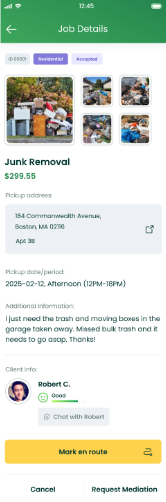
Step 1 — Change Status to “En Route” #
- Before heading to the address, open the app and tap En Route.
- This automatically notifies the client you are on your way.
- The system will show an estimated arrival time (30–60 minutes).
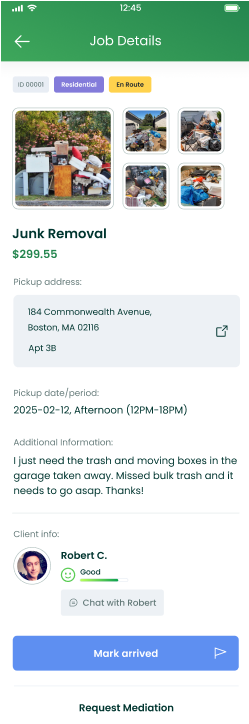
Step 2 — Upon Arrival: Mark as “Arrived” #
- Once on-site, change the status to Arrived.
- The app will then ask for Before Photos:
- Wide shots of the site.
- Clear photos of the items.
- Truck bed/trailer empty (required for payment).
- Wide shots of the site.
Important: Photos must be clear. If unclear, the audit team may need to call the client or contact you, slowing down payment.
4.3 Loading the Items #
- Begin loading the items safely and efficiently.
- Protect the client’s property.
- If the client is present, follow any additional instructions.
4.4 After Work Is Completed #
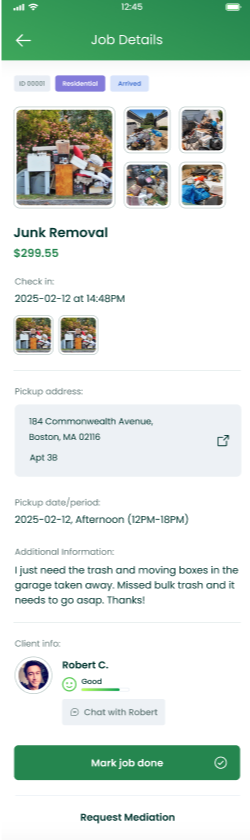
Mark Job as “Done” #
When finished, open the app and:
- Tap Job Done.
- Upload required After Photos:
- The site clean and empty.
- Swept area if applicable (bring a broom for quick touch-ups).
- Truck bed/trailer loaded with the items.
- The site clean and empty.
A clean job site increases the chance of receiving tips — clients appreciate good presentation!
4.5 Final Step #
- Confirm all photos are uploaded.
- Be polite and thank the client.
- Drive off safely.
You’re ready for the next job!


