
Table of Contents
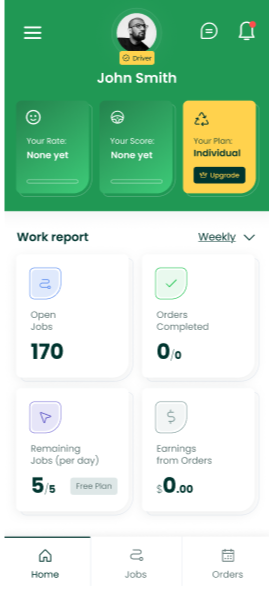
When you open the app, the first screen you see is the Dashboard. Here you will find:
- Open Jobs – all jobs currently available in your service area.
- Completed Orders – jobs you’ve already finished.
- Earnings – total amount earned (feature coming soon).
At the bottom navigation bar, you will see:
- Home – your main dashboard.
- Jobs – the section where all available jobs appear. There are two types:
- In Bid Jobs
- Pre‑Set Price Jobs
- In Bid Jobs
In Bid Jobs (Most Common) #
These are the most frequent jobs you’ll see. “In Bid” means Grunber needs your price so we can quote the client.
How In-Bid Jobs Work: #
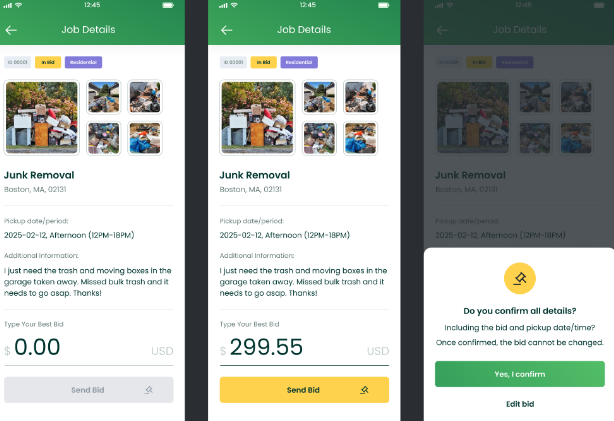
- Open the job and review all available pictures.
- Sometimes the client does not upload pictures.
- Example: A single queen mattress in the basement with no photo. If the description is clear, you can still bid.
- Sometimes the client does not upload pictures.
- The price field ($0.00) will be blank — this is where you enter your best competitive price.
Important Notes When Bidding: #
- Price is king. Clients compare prices before booking.
- Depending on the area, Grunber may receive multiple bids from different vendors.
- We will select the best bid and send our quote to the client.
- Make sure your price is worth your time, considering distance and disposal costs.
- If you send a very low price and later decline the job after the client approves it, you will receive a penalty and may be restricted from future jobs.
Location Visibility: #
- On the bidding screen, we only show City and ZIP Code.
- After you are assigned the job, the full address and details appear.
Important Notes After You Submit Your Bid: #
- After you and other vendors submit bids, Grunber sends a quote to the client.
- Some clients request same‑day service — if this job gets approved, you must move quickly.
- Some clients request service for future dates — next day, next week, etc.
- Many clients do not respond immediately. If they don’t decline, our team follows up the next day.
- We continue following up until the client either pays for the service or says they no longer need it.
- Please be patient. Sometimes deals close fast, other times it takes a bit longer.
- Once the client approves the quote, you will receive a notification that the job is booked.
Our sales team always works hard to close the deal for you — but there is no magic. Timing varies.
Pre-Set Price Jobs #
These jobs already come with a fixed payout — no bidding required.
How Pre-Set Price Jobs Work: #
- You will see a job with a pre-set price, for example: $150.00.
- Example description: “1 king-size mattress at the curbside” with a picture attached.
- This means Grunber already has a budget for the job.
- You cannot change the payout. If your normal rate is higher (e.g., $160), you still cannot enter your own price.
Important Rules for Pre-Set Jobs: #
- These are first come, first serve.
- If you want the job, tap Accept Job immediately.
- Before accepting, always verify:
- Pickup date
- Pickup time window
- City + ZIP code (full address appears after acceptance)
- Pickup date
Only accept if you are 100% sure you can complete the job at the client’s requested schedule.


